Showing posts with label student collaboration. Show all posts

Tuesday, June 26, 2018

Making Students Aware of the 4Cs

This post is week 3 of 8 in the 8 Weeks of Summer Blog Challenge for educators from hotlunchtray.com. Find out more by clicking here.

I am constantly thinking about the "4Cs of the 21st Centruy" when I work with students or coach teachers. The 4C skills are: Creativity, Collaboration, Communication, and Critical Thinking. 


According to many, like P21.org, these are the skills that our students need to be successful in the current workplace, as well as the workplace they will walk into. Until recently, I hadn't put too much thought in making the students fully aware of how classroom activities are developing these skill sets for them. Yes, I've shared with students before how their time at school should and will be spent developing these skills along with learning content, but I don't promote them on a daily basis with students. I plan on making this change for my learners in the coming school year.

It is common practice to display the student learning objectives for the students in every lesson. Along with those objectives, I'm going to begin displaying a 21st Century Skill objective for them as well. The idea being that by the second semester of the school year, students themselves will be able to identify which skill they are developing. To me this doesn't have to be a major shift in anything my colleagues and I are currently doing. Some examples of this could look like:


These are two pretty basic statements that I can post for students, but they could make them aware of the fact that we are working on these skills. 

Tuesday, November 14, 2017

Tools to Support Student Inquiry


Inquiry Based Instruction has been an area of study for me for the last couple of years. In my opinion, teaching through inquiry is not only engaging for our students, but develops an essential skill that our kids need to be successful in the 21st century. In this post, I want to share a few of the resources I have been using for the last few years, as well as a few resources that I just learned about.

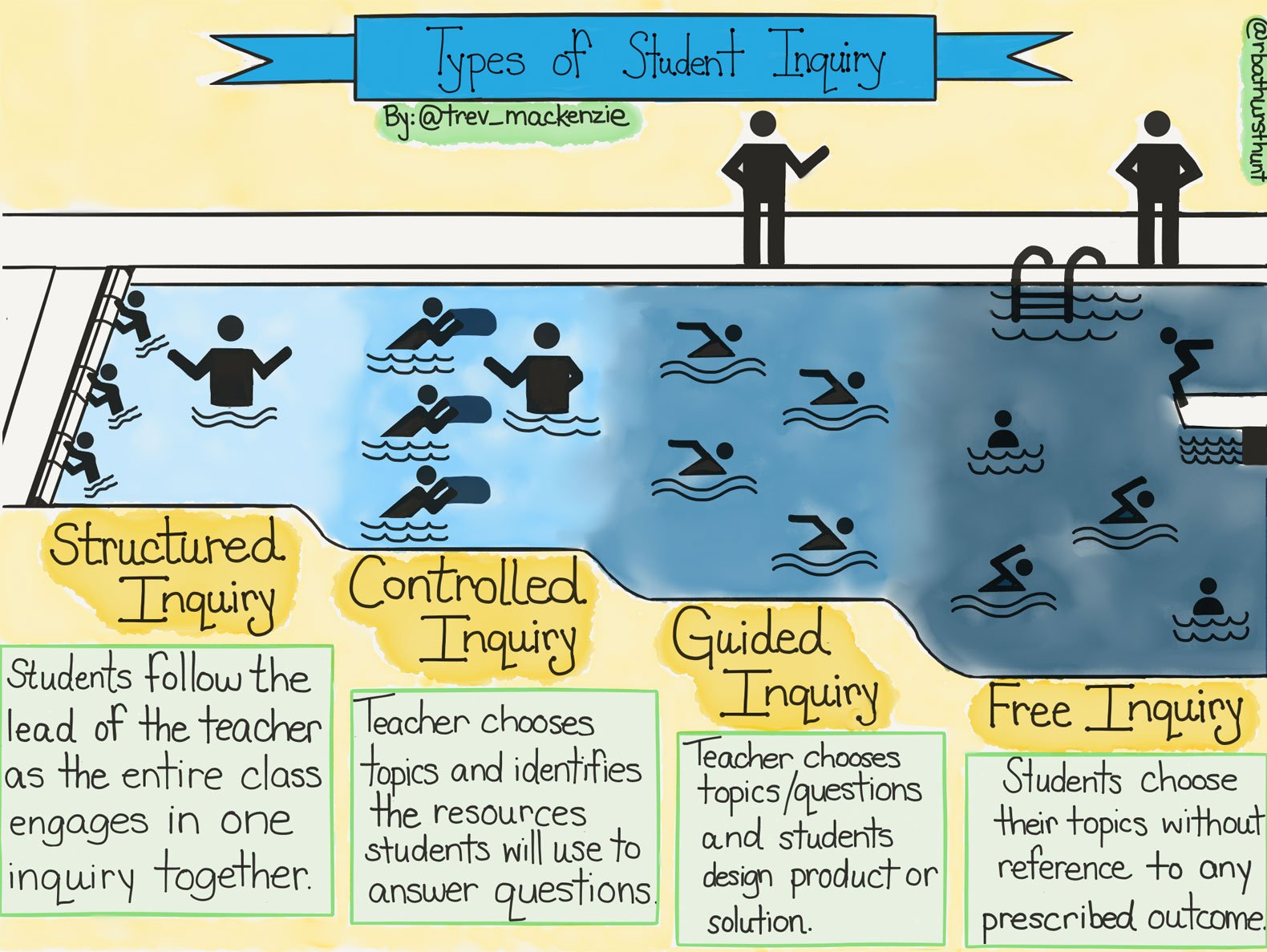
Before finding your digital resources to support inquiry in your classroom, I highly recommend reading Trevor MacKenzie's book, Dive Into Inquiry. In his book, MacKenzie walks teachers through the 4 types of student inquiry: Structured, Controlled, Guided, and Free. This process allows educators to understand that inquiry based instruction is not just a free for all approach, but a structured practice.


Wonderopolis - K-6
Image result for wonderopolis

Wonderopolis is a fantastic website that models inquiry for students and teachers. Every topic on Wonderopolis begins with a question, and then follows up with an article that allows students to explore that question. Your students can even submit questions to the Wonderopolis site as well as vote on other questions on the site to be explored next.

The Question Formulation Technique or QFT is a collaborative way for students to work in teams to brainstorm questions based off of a teacher given focus. It teaches students how to prioritize their questions and evaluate the differences between open ended and closed ended questions. The Right Question Institute website is full of resources to make the QFT process a success in your classroom. 

Genius Hour 4 - 12
Genius HourAs students  toward Free Inquiry, the Genius Hour website give students and teachers a structure on how to be successful during a self driven process. The Genius Hour practice is based off of what Google implements with their development team. Giving their employees time to work on self-interest projects that have potential to improve the company, has allowed Google to create many of their popular products. What Genius Hour attempts to do is bring this ideology into your classroom. Giving students the option to choose projects that will have potential to improve their understanding of a concept or pass through a competency.  

Do you have a resource you use for inquiry based instruction? Please share it below!

Wednesday, April 5, 2017

Facilitate Online Discussions with Backchannel Tools


There are many Learning Management Systems out there, such as Google Classroom and Seesaw, that allow teachers to post information and questions. In return, students can make comments when prompted by the teacher. While this can be an engaging piece, it still doesn't feel very conversational. This is where using a Backchannel chat can be used facilitate discussions between your students either in the classroom or from a distance.

I know what you may be thinking... "Did he just say chat? As in a chat-room?" Yes chat rooms can have negative connotations with them, but when used correctly in an educational setting, they can be a safe discussion alternative. Two backchannel sites that I am going to suggest allow the teacher to create a virtual room that can only be accessed with a specific link shared by a teacher. This means that you have total control of who has access, keeping your students safe.

Why should I try a backchannel discussion with my students?
First and foremost I am not saying that these discussions should replace verbal discussions you have with your students. Giving students the opportunity to collect their thoughts and speak them verbally is a skill that is different then typing them out on a screen. However, occasionally using a backchannel has an advantage as well. These virtual rooms allow a teacher to save/print the conversations had with students. This gives the teacher a record of student participation within a content conversation, as well as leaves a record of the students understanding.

There are many backchannel sites out there, but two that I have used are TodaysMeet and Chatzy.

TodaysMeet
TodaysMeet is an easy to set up and use virtual chat room geared for classroom usage. After logging in, which it does allow you to login with Google, you are sent to a simple dashboard to set up as many rooms as you like.

After setting your room up, all you need to do is share the link with your students, and your class is ready to have a discussion. At the end of your discussion, you may save/print the transcript.


Chatzy
Chatzy doesn't advertise itself as an education site quite as much as TodaysMeet, however several of it's safety features make it great to use in your classroom.


You can add a password to the chat along with allowing or blocking several features for users. Chatzy also allows them to embed YouTube Videos or Internet Images if they wish. This could allow for some creative answers. These are features that could be turned on or off.


The beauty in these and other backchannel tools is the simplicity to them. These tools allow the students to focus on the conversation and not get too wrapped up in the bells and whistles that they are used to seeing in social media.

If you have a backchannel that you like to use, please add it to the comments below!

Thursday, June 2, 2016

Computer Science Practice Standards - An introduction to #CSforALL

This past fall (2015), I was lucky enough to be a part of the K-8 Computer Science Standards Committee for the state of Arkansas. Arkansas is the first state in the US to require all students in K-8 learn computer science standards. These standards will be embedded in other curriculum areas, CS will not be a stand alone subject. All of Arkansas's high school's must have CS courses available for interested students as well.

The Computer Science Standards (Linked HERE from the ADE Website) begin with a set of Computer Science Practices. These practices exhibit the "habits of mind" that it takes to succeed in the area of Computer Science. Many teachers will agree that these are also great habits to succeed in every subject.

Using Piktochart, I decided to make a printable poster for these practices. Please feel free to use and share this poster with your fellow teachers. Link to download poster: bit.ly/arcsprac


Friday, November 21, 2014

Student Collaboration Tips for Docs & Slides

Google Apps for Education have allowed teachers to expand their classrooms in so many ways. My absolute favorite thing about Docs, Sheets, and Slides are the multiple opportunities that students have to work collaboratively within.

Here are a couple simple tips for organizing Docs and Slides for Collaboration.
  

Thursday, November 13, 2014

Tracking Student Work in Google Docs

Many teachers are really enjoying the fact that Google Apps for Education allows their students to work collaboratively. One of the many concerns of students working together has always been, "How can I tell which student has done what work?" Well thanks to the revision history in Google Docs, it is easy to see who has done what work, and when they did that work. This is a great assessment tool and will keep students accountable during collaborative work.